Shared calendar
One shared family calendar that syncs with Google, Outlook, and iCloud
School concerts, work meetings, pickups, and appointments in one family view, synced with the calendars you already use.
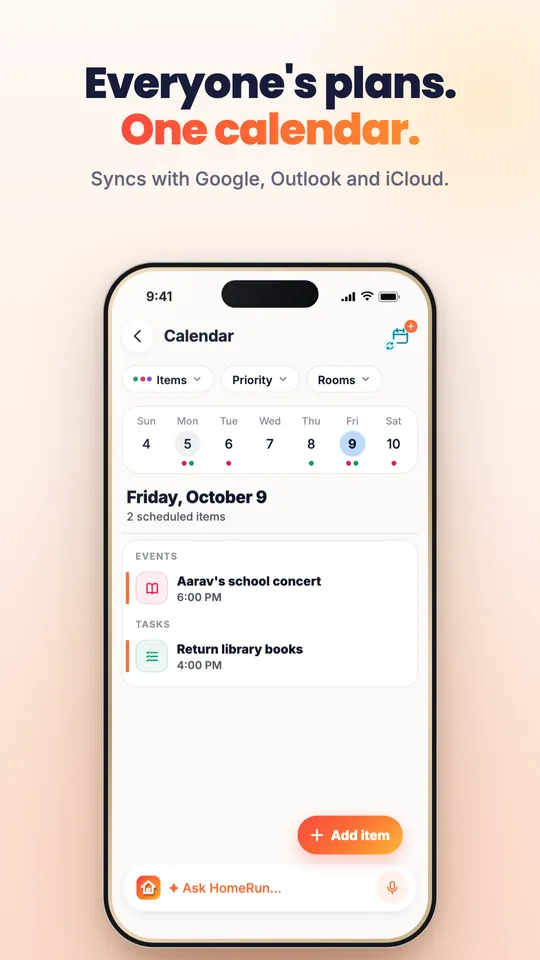
Home Run is a shared family calendar with an AI assistant built in. It brings everyone's events into one view, syncs with Google Calendar, Outlook, and iCloud, and lets you add events by chat or voice, such as "schedule a meeting with Kevin at 3 PM". Events can be filtered by person, priority, or room, and the right people are reminded before each one.
ParentSchedule a meeting with Kevin by 2 PM today.
Home RunIt's 1:54 PM here. What start time should I use for the meeting with Kevin?
ParentJust do it for 3 PM.
Home RunDone. I scheduled the meeting for today at 3:00 PM.
The everyday problem
Every family member has a different calendar, and none of them agree.
Work lives in Outlook, school lives in a PDF, and the family plan lives in a group chat. Clashes only show up when two people need the car at the same time.
- A parent's work calendar does not know about the school concert.
- Kids' activities are shared as screenshots that no one can search.
- Nobody is sure who is picking up whom until the last minute.
The Home Run solution
One calendar the whole family can see, that updates itself from conversation.
Home Run pulls the calendars you already use into one family timeline, and adds new plans straight from chat or voice so nothing has to be typed twice.
- Sync Google, Outlook, and iCloud calendars into one family view.
- Add events by chat or voice, with the right date, time, and people.
- Filter by person, priority, or room to see only what matters.
Features
Built for busy family schedules.
Each feature serves one goal: everyone knows what is happening, when, and who is responsible.
Calendar sync
Connect Google Calendar, Outlook, and iCloud so work and personal plans appear in one place.
Events from chat and voice
Say what needs to happen and Home Run creates the event, asking follow-up questions when details are missing.
Shared family view
See everyone's events together to spot clashes before they happen.
Smart reminders
The right person gets a reminder with the details they need, at the right time.
Filters by room and priority
Focus on school, work, or care events, or on what is urgent today.
Tasks on the timeline
Tasks, meal plans, and deadlines sit next to events so the whole day is visible.
How it works
Say it once. It is on everyone's calendar.
One sentence becomes a scheduled event, with reminders and the right people attached.
Connect the calendars you already use, or start fresh in Home Run.
Tell Home Run about a plan by chat or voice.
Home Run confirms the time and details, and asks if anything is missing.
The event appears for the right family members, with reminders before it starts.
Family coordination
Everyone sees the plan that affects them.
Parents see the whole week, partners see shared commitments, and kids see their own activities and pickups.
- ParentExample: Maya
Sees the whole family week, including work meetings synced from Outlook.
- PartnerExample: Raj
Gets a reminder for the school concert and the pickup he agreed to.
- ChildExample: Aarav
Sees his cricket practice, library book due date, and who is driving.
Events can live in rooms, so helpers and relatives only see the plans they are part of.
Smart recommendations
Heads-ups before the clash, not after.
Home Run looks across the family schedule and flags problems early.
- Two pickups overlap on Thursday at 4 PM. Ask Raj to take one?
- The library books are due Friday. Add a reminder for Aarav tonight?
- Dinner plans clash with Maya's late meeting. Move dinner to 8 PM?
Privacy first
Your calendar stays inside your family space.
Calendar data you connect is used only to provide the features you turn on.
How Home Run protects family dataWhy families trust it
Home Run follows Google's Limited Use requirements for calendar data and never uses it to train generalized AI models.
Connected calendars are used only for syncing, search, and scheduling features.
Family events are visible only to members of the relevant rooms.
You can disconnect a calendar at any time.
FAQ
Family calendar: common questions
Does Home Run sync with Google Calendar?
Yes. Home Run syncs with Google Calendar, Outlook, and iCloud, so events from work and personal calendars appear in one family view.
Can I add events by voice?
Yes. Say something like "schedule a meeting with Kevin at 3 PM" and Home Run creates the event, asking for any missing details first.
Can each family member see only their own events?
Everyone can see the shared family view, and events can be organized into rooms so helpers and relatives only see the plans they are part of.
Is my calendar data used to train AI?
No. Home Run does not use Google Calendar data to train generalized AI models and follows Google's Limited Use requirements.
Put the whole family on one calendar
See how Home Run keeps everyone's plans in sync. Or explore the other ways Home Run helps.
Meals and groceries
Turn voice and chat into organized meal plans, grocery lists, pantry tracking, and family dinner coordination.
Learn moreSchool and tasks
Keep assignments, chores, pickups, reminders, and study plans coordinated automatically across the family.
Learn moreCare and records
Keep prescriptions, reports, appointments, and health reminders searchable, organized, and accessible for the whole family.
Learn moreFamily updates
Transform voice notes, chats, updates, and household conversations into shared clarity for everyone.
Learn moreDocuments
Passports, policies, and reports, found in seconds and renewed on time.
Learn moreExpenses
Split family expenses, track shared spending, and settle up without awkward reminders.
Learn moreTrips
Itinerary, packing, and tasks in one place, so the whole family is ready to go.
Learn more