How Home Run works
Your private family AI assistant for everyday life
Home Run helps your family organize calendars, tasks, chores, meals, shopping, school activities, documents, care information, and family updates through one private assistant.
The system that understands your household
What is the Home Run AI family organizer?
Home Run is an AI family organizer and household management app. It combines a family task manager, AI assistant, meal planner, grocery list, school planner, care organizer, document hub, and family chat in one connected product.
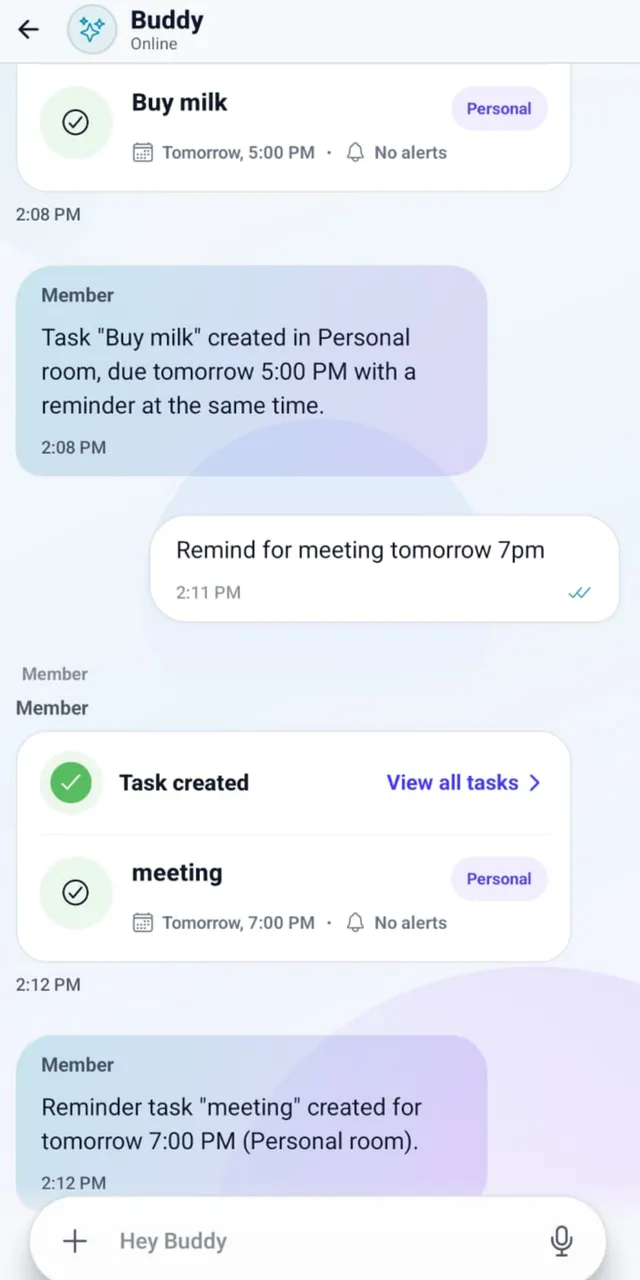
Instead of maintaining separate lists and repeating the same context, families tell Home Run what they need. It listens for intent and turns one natural-language request into the right connected household actions.
Coordinate tasks, chores, meals, schedules, care, and documents.
Use voice or chat to capture what needs to happen.
Keep responsibility, timing, people, and context connected.
How Home Run carries your day
From morning rush to evening reset
One conversation can become several coordinated actions, without one person carrying all of the follow-up.
Morning coordination
"What's on our plate today?"
Home Run brings together today's tasks, plans, and reminders so everyone knows what matters before the day starts.
School and work
"Remind me about the science fair."
The deadline becomes a task with the right date, person, calendar context, and follow-up.
Meals and shopping
"Add chicken, rice, and broccoli."
The grocery list updates, and the meal plan stays visible to whoever is cooking or shopping.
Evening family update
"Give me today's family summary."
Home Run summarizes what changed, what was completed, and what still needs an answer.
Getting started
Six steps from family space to shared follow-through
- 1
Create your family space
Add the family members or trusted people who need to take part.
- 2
Create rooms
Organize meals, school, care, travel, or general household management.
- 3
Tell Home Run what you need
Use text or voice to create tasks, reminders, meals, lists, schedules, and updates.
- 4
Assign and organize
Choose who is responsible, when something is due, and where it belongs.
- 5
Track progress together
Members see relevant work, update status, and know what is still pending.
- 6
Ask for an update
Get a clear view of today's work, groceries, meals, school tasks, or family decisions.
Rooms
The right people see the right household context
Rooms organize selected members, tasks, conversations, files, and plans around one part of family life.
Meals
- Weekly meal plan
- Recipe ideas
- Grocery list
School
- Class schedule
- Assignments
- Activities and events
Care
- Appointments
- Medications
- Care notes
Trip planning
- Itinerary
- Packing list
- Travel documents
Who it is for
One app, different family rhythms
Home Run adapts to the people, routines, and responsibilities that make each household work.
Couples
Share responsibilities, meals, bills, routines, and plans without repeated check-ins.
Families with children
Coordinate school, activities, meals, assignments, pickups, and family updates.
Joint families and caregivers
Keep care, health, appointments, responsibilities, and handoffs visible.
Natural language, organized outcomes
What can I ask Home Run?
Families do not think in software modules. They say what needs to happen, and Home Run organizes the plan behind each request.
Tasks and reminders
"Remind me to pay the electricity bill on Friday."
Meals
"Create a meal plan for the next seven days."
Groceries
"Show all unpurchased grocery items."
School
"What school activities are scheduled this week?"
Family planning
"Summarize the decisions from our trip discussion."
Care
"When is Mom's next appointment?"
Comparison
How Home Run differs from disconnected family tools
A calendar, a list, or a group chat can each be useful. Home Run brings those functions together as a household assistant that keeps intent, responsibility, timing, and information connected.
| Capability | Basic to-do app | Shared calendar | Messaging app | Home Run |
|---|---|---|---|---|
| Family tasks | Yes | Limited | Unstructured | Yes |
| Task assignments | Yes | Limited | Manual | Yes |
| Reminders | Yes | Yes | Limited | Yes |
| Meal planning | Rarely | No | Unstructured | Yes |
| Grocery lists | Sometimes | No | Unstructured | Yes |
| School coordination | Manual | Partial | Unstructured | Yes |
| Documents | Limited | Attachments only | Buried in chats | Organized by context |
| Family rooms | Rarely | No | Groups only | Yes |
| AI assistant | Rarely | Rarely | General chat | Household-focused |
| Connected household context | Limited | Limited | No | Yes |
Product capabilities and other apps change over time. Review the latest product information when comparing family organization tools.
Private by design
Private household spaces, with clear family control
Family information is shared only with the people and services needed for the features you choose, according to your settings and the privacy policy. Members control what they add and which rooms they join.
Read about privacy and security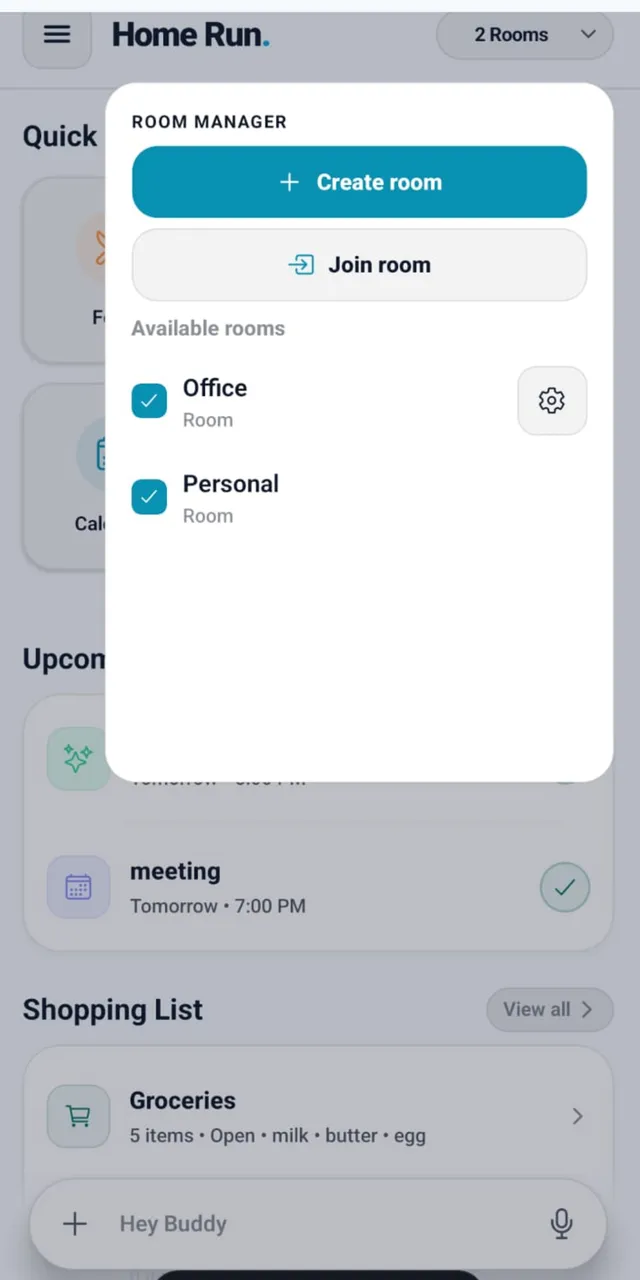
FAQ
Frequently asked questions about Home Run
Clear answers for families evaluating an AI-powered household organizer.
What is Home Run Family AI?
Home Run is a private family AI assistant and AI family organizer app that helps households coordinate tasks, reminders, meals, groceries, schedules, school activities, documents, care information, and family updates.
Is Home Run an AI household assistant?
Yes. Home Run is an AI family assistant and AI household assistant that helps family members create and organize household activities using natural language, through voice or chat.
Can Home Run create family tasks and reminders?
Yes. Family members can create tasks, assign them to the right people, add due dates, set reminders, and track progress.
Can Home Run work as a chore app?
Yes. Home Run works as a family chore app for recurring or one-time chores, and makes responsibility visible to the whole household.
Does Home Run support meal planning?
Yes. Home Run includes a meal planner that helps households plan meals for selected dates, meal times, family members, and serving sizes.
Can the family share grocery lists?
Yes. The right family members can add, review, and update shared household shopping items.
Can Home Run organize school tasks?
Yes. Families can organize school tasks, projects, deadlines, activities, reminders, and related documents.
Can I store family documents in Home Run?
Home Run can organize household documents and connect them to the relevant rooms, tasks, events, or activities. Review the privacy policy before adding sensitive files.
What are rooms in Home Run?
Rooms are shared spaces that organize selected people, tasks, conversations, and information around one part of family life, such as meals, school, care, or a trip.
Can Home Run summarize a family discussion?
Where enabled, Home Run can turn a discussion into a summary of decisions, tasks, responsibilities, and open questions.
Is Home Run only for parents with kids?
No. Couples, families with children, joint families, and households with trusted helpers can all organize the responsibilities relevant to them.
Can helpers or caregivers join?
Yes. A household may add trusted helpers to the relevant rooms so they can take part in the responsibilities shared with them, subject to permission settings.
Does Home Run give medical advice?
No. Home Run can organize care information, reminders, and documents, but it does not replace a doctor, emergency service, or qualified medical professional.
Is Home Run private?
Home Run is designed around private household spaces. Members control what they add and which rooms they join, subject to the privacy policy and available permission settings.