Expenses
Split family expenses and see who owes whom, at a glance
Split family expenses, track shared spending, and settle up without awkward reminders.
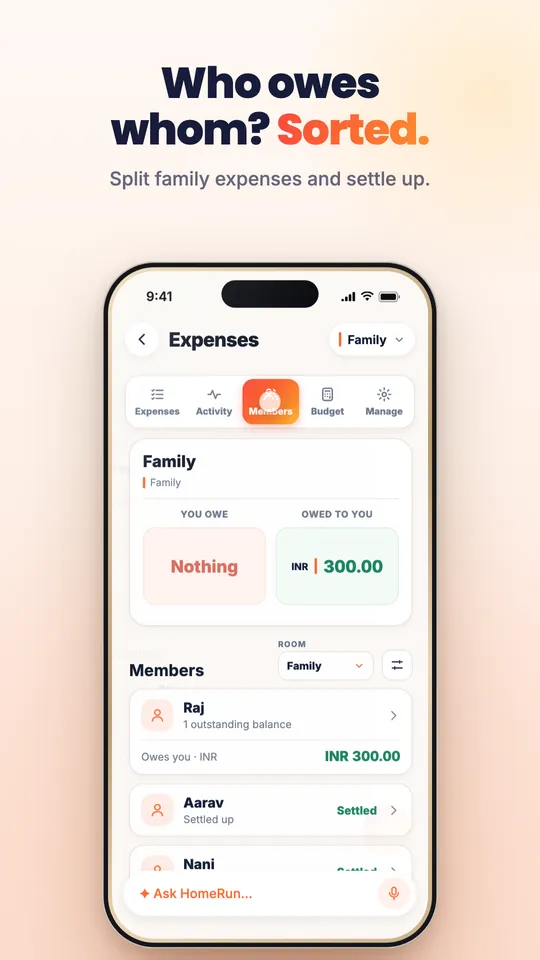
Home Run includes a family expense tracker. Add shared costs by chat or voice, such as "split tonight's dinner bill between Raj and me", and Home Run records the expense, splits it between the right people, and shows each member's balance: what you owe, what you are owed, and who has settled up.
ParentSplit tonight's dinner bill of ₹2,400 between Raj and me.
Home RunDone. Raj owes you ₹1,200. I added it to the Family expenses.
RajPaid you back.
Home RunMarked as settled. The Family room is all square.
The everyday problem
Shared costs turn into awkward maths and forgotten IOUs.
Groceries, school fees, trips, and utilities get paid by whoever is nearest. Weeks later, nobody remembers who paid for what.
- One person keeps paying and quietly keeps score.
- Trip costs are split in a spreadsheet no one updates.
- Reminders to pay back feel awkward inside family chats.
The Home Run solution
Every shared expense recorded, split, and settled in one place.
Home Run keeps a running family ledger so balances are clear and settling up is one tap.
- Add expenses by chat or voice as they happen.
- Split between the right family members automatically.
- See who owes whom and mark balances as settled.
Features
Built for shared family money.
Clear balances without spreadsheets or awkward conversations.
Expenses by chat or voice
Record a cost the moment it happens, in plain language.
Fair splits
Split costs between the family members involved.
Balances at a glance
See what you owe and what you are owed across the family.
Settle up
Mark balances as settled so everyone starts fresh.
Activity history
See every shared expense and who paid, in one timeline.
Budgets and rooms
Keep trip, household, and personal expenses in separate rooms.
How it works
Pay. Say it. Sorted.
One sentence records the expense and updates everyone's balance.
Tell Home Run what was paid, by whom, and for whom.
Home Run records the expense in the right room.
Balances update for each family member.
Settle up when you are ready, and the balance resets.
Family coordination
Everyone sees the same numbers.
No more keeping score in your head. Each member sees their balance and the history behind it.
- ParentExample: Maya
Adds grocery and school expenses as she pays them.
- PartnerExample: Raj
Sees he owes ₹300 and settles up in one tap.
- TeenExample: Aarav
Tracks his share of the trip budget.
Trip expenses can live in their own room, separate from household costs.
Smart recommendations
Gentle nudges instead of awkward reminders.
Home Run keeps balances fair without anyone having to chase.
- Raj has an open balance of ₹300 from last week. Send a friendly reminder?
- The Goa trip room has 6 unsplit expenses. Split them equally?
- Grocery spending is higher this month. Review the recurring items list?
Privacy first
Family finances stay in the family.
Expense data is private household information, visible only to the members of each room.
How Home Run protects family dataWhy families trust it
Expense records live in your private household space, and each room decides who can see them.
Expenses are visible only to members of the relevant room.
Home Run does not sell personal information or use it for advertising.
You can edit or delete expenses at any time.
FAQ
Expenses: common questions
Can Home Run split expenses between family members?
Yes. Add an expense and choose who it is split between, and Home Run updates each person's balance.
Does Home Run show who owes whom?
Yes. Each member sees what they owe and what they are owed, and balances can be marked as settled.
Can I track trip expenses separately?
Yes. Expenses can be kept in separate rooms, such as a trip room, so they do not mix with household costs.
Can I see the history of shared expenses?
Yes. The activity view shows each shared expense, who paid, and how it was split.
Settle family expenses without the awkwardness
See how Home Run keeps shared money clear and fair. Or explore the other ways Home Run helps.
Meals and groceries
Turn voice and chat into organized meal plans, grocery lists, pantry tracking, and family dinner coordination.
Learn moreSchool and tasks
Keep assignments, chores, pickups, reminders, and study plans coordinated automatically across the family.
Learn moreCare and records
Keep prescriptions, reports, appointments, and health reminders searchable, organized, and accessible for the whole family.
Learn moreFamily updates
Transform voice notes, chats, updates, and household conversations into shared clarity for everyone.
Learn moreFamily calendar
School concerts, work meetings, pickups, and appointments in one family view, synced with the calendars you already use.
Learn moreDocuments
Passports, policies, and reports, found in seconds and renewed on time.
Learn moreTrips
Itinerary, packing, and tasks in one place, so the whole family is ready to go.
Learn more